
What Is Motion Blur?
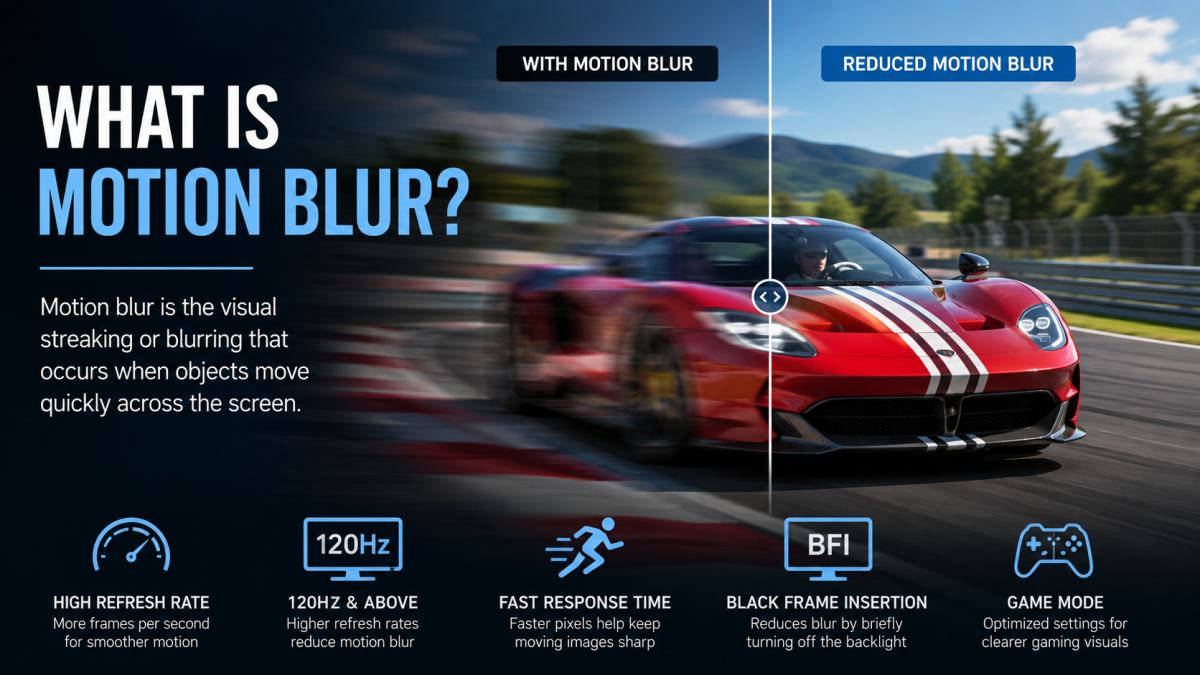
Motion blur is a visual effect that causes moving objects to appear blurred or streaked across a screen. It can occur in movies, television broadcasts, video games, and sports content when movement happens faster than a camera, display, or even the human eye can clearly process.
While a certain amount of motion blur is natural and often intentional, excessive blur can reduce image clarity and make fast-moving scenes appear less sharp. Understanding what motion blur is can help you choose the right TV, monitor, or gaming display for your needs.
What Causes Motion Blur?
Motion blur can be caused by several different factors. In many cases, multiple factors work together to create the effect.
The most common causes include:
- Camera shutter speed during filming
- Display response time
- Low refresh rates
- Eye tracking of moving objects
- Video compression artifacts
- Motion processing performed by the TV
Movies and TV shows often contain intentional motion blur because cameras capture movement over a short period of time. This creates a more natural cinematic look.
Motion Blur in Televisions
Motion blur is especially noticeable on televisions during sports, action movies, racing events, and fast-moving scenes. Older LCD TVs were particularly prone to motion blur because their pixels changed state relatively slowly.
Modern televisions have improved significantly through faster response times, higher refresh rates, and advanced image processing technologies.
Premium OLED TVs and high-end Mini LED TVs generally offer excellent motion handling compared to older display technologies.
Motion Blur in Gaming
Gamers often notice motion blur when playing fast-paced games such as first-person shooters, racing games, and competitive multiplayer titles. Excessive blur can make it difficult to track moving targets or see fine details during rapid movement.
Many gaming-focused displays now include technologies specifically designed to reduce motion blur and improve responsiveness.
Features commonly found on gaming TVs include:
- 120Hz refresh rates
- Variable Refresh Rate (VRR)
- Auto Low Latency Mode (ALLM)
- Fast response times
- Black Frame Insertion (BFI)
How Refresh Rate Affects Motion Blur
Refresh rate plays a major role in motion clarity. A television’s refresh rate determines how many times the screen updates each second.
- 60Hz = 60 screen updates per second
- 120Hz = 120 screen updates per second
- 144Hz and above = even smoother motion
Higher refresh rates help reduce perceived blur and make motion appear smoother, particularly during gaming and sports viewing.
Response Time and Motion Blur
Response time refers to how quickly a pixel can change from one color to another. Slower response times can create visible trails or ghosting behind moving objects.
Modern OLED displays have extremely fast response times, which is one reason they are often recommended for gaming and sports.
Fast response times help improve motion clarity and reduce visible artifacts during fast-moving scenes.
How TV Manufacturers Reduce Motion Blur
Television manufacturers use several technologies to improve motion performance.
Motion Interpolation
Motion interpolation creates additional frames between existing frames to make movement appear smoother. Manufacturers often market this feature under different brand names.
Black Frame Insertion
Black Frame Insertion briefly inserts black frames between displayed images. This can improve perceived motion clarity and reduce blur caused by eye tracking.
Higher Refresh Rates
Many premium televisions now feature native 120Hz panels, which provide smoother motion than standard 60Hz displays.
OLED vs LED: Which Handles Motion Better?
OLED TVs generally handle motion better than traditional LED TVs because OLED pixels can change state almost instantly.
This fast pixel response helps reduce ghosting and motion blur, resulting in clearer movement during sports broadcasts and gaming sessions.
Many of the best OLED TVs available today offer some of the strongest motion performance on the market.
Is Motion Blur Always Bad?
Not necessarily. In movies, motion blur is often intentional and helps create a more natural cinematic appearance. Without motion blur, movement can sometimes appear choppy or unrealistic.
The goal is not to eliminate motion blur completely but to reduce excessive blur that negatively affects image quality.
How to Reduce Motion Blur
If motion blur bothers you, there are several ways to improve motion clarity:
- Choose a TV with a 120Hz panel
- Enable motion enhancement settings
- Use Game Mode when gaming
- Look for TVs with fast response times
- Consider OLED technology
- Use Black Frame Insertion if available
These features can significantly improve the viewing experience for sports fans and gamers.
Should You Worry About Motion Blur?
For casual TV viewing, motion blur is usually not a major concern. However, if you frequently watch sports, action movies, or play video games, choosing a display with strong motion handling can make a noticeable difference.
Modern OLED TVs, Mini LED TVs, and gaming-focused televisions offer excellent motion performance and are far less susceptible to motion blur than older displays.
Understanding motion blur can help you make a more informed purchasing decision and ensure you get the best viewing experience possible. “`